Advanced Liquid
Liquid glossary
-
Output or Mail Merge: Liquid that displays text for a user. Will always use {{…}}
-
Tags: Liquid to set conditions. Is not exposed to end user. Always uses {%…%}
-
Filters: Perform equations or commands within tags. You can use if, elsif, else and endif.
-
Operators: Used to make logical comparisons. Works with tags. You can use ==, !=, <, >, and, or , contains, has.
-
Arrays: Liquid where you assign a foundation to compare your conditions against and then take action based on those conditions.
Mail merge fields
Mail merging fields are fields that you can insert as text into a message (the output). There are two types of mail merging fields:
-
Default Fields: Standard profile fields in Mobile Commons.
-
Custom Fields: Profile fields that you create in Mobile Commons.
Default mail merge fields
Below is a list of the default mail merge fields used in Mobile Commons. In parentheses next to the field name is the number of characters that should be accounted for when drafting your liquid messages.
-
first_name (9 characters maximum)
-
last_name (11 characters maximum)
-
street1 (30 characters maximum)
-
street2 (13 characters maximum)
-
city (14 characters maximum)
-
state (2 characters maximum)
-
state_name (14 characters maximum)
-
postal_code (5 characters maximum)
-
email (25 characters maximum)
-
representative (29 characters maximum)
-
junior_senator (22 characters maximum)
-
senior_senator (22 characters maximum)
-
state_representative (38 characters maximum)
-
state_senator (38 characters maximum)
-
carrier_name (17 characters maximum)
-
phone_number (18 characters maximum)
Custom fields
You can use custom fields to capture and return any value based on the form field type. Make sure to replace spaces with ‘_’. Example: Last Donation Date -> last_donation_date.
Types:
-
Yes/No (very easy to work with in Liquid!)
-
Gender
-
Time of Day
-
Date
-
Age Type
-
Text
-
Number
Outputs
Best practice
-
Using outputs effectively are a great way for personalizing messages and for confirming profile information.
-
Outputs will insert a profile’s stored value for a default or custom field into a message to the profile user.
-
To insert an output in your message, always use double curly brackets: {{…}}
Setting defaults
-
If a profile user does not have data for the intended output field – you can insert a placeholder to create stand-ins for blank values by inserting ‘|’
{{first_name | default: ‘friend’}}
-
In the above example, if you were to send this broadcast to a profile that doesn’t have a value associated with first_name – the text would read “Hey friend!” instead of “Hey Frederick!”
Filters
All available filters:
-
default - use a default value e.g. Dear {{ first_name | default: 'Customer' }}, -> 'Dear Customer,'
-
date - format a date.
-
timezone - convert a date to a different timezone. Expects a timezone name parameter, eg ('Eastern' or 'Pacific'). Useful for converting UTC to a local time.
-
capitalize - capitalize words in the input sentence.
-
downcase - convert an input string to lowercase.
-
upcase - convert an input string to uppercase.
-
first - get the first element of the passed in array.
-
last - get the last element of the passed in array.
-
join - join elements of the array with certain character between them.
-
sort - sort elements of the array.
-
map - map/collect an array on a given property.
-
size - return the size of an array or string.
-
escape - escape a string.
-
escape_once - returns an escaped version of html without affecting existing escaped entities.
-
strip - strip any whitespace from right and left of string (can also use lstrip and rstrip).
-
strip_html - strip HTML from string.
-
strip_newlines - strip all newlines (\n) from string.
-
newline_to_br - replace each newline (\n) with html break.
-
replace - replace each occurrence e.g. {{ 'foofoo' | replace:'foo','bar' }} -> 'barbar'
-
replace_first - replace the first occurrence e.g. {{ 'barbar' | replace_first:'bar','foo' }} -> 'foobar'
-
remove - remove each occurrence e.g. {{ 'foobarfoobar' | remove:'foo' }} -> 'barbar'
-
remove_first - remove the first occurrence e.g. {{ 'barbar' | remove_first:'bar' }} -> 'bar'
-
timezone - convert timezone e.g. {{'2014-09-01 09:00:00 EDT' | timezone:'pacific'}}
-
truncate - truncate a string down to x characters.
-
truncatewords - truncate a string down to x words.
-
prepend - prepend a string e.g. {{ 'bar' | prepend:'foo' }} -> 'foobar'
-
append - append a string e.g. {{ 'foo' | append:'bar' }} -> 'foobar'
-
minus - subtraction e.g. {{ 4 | minus:2 }} -> 2
-
plus - addition e.g. {{ '1' | plus:'1' }} -> '11', {{ 1 | plus:1 }} -> 2
-
times - multiplication e.g {{ 5 | times:4 }} -> 20
-
divided_by - division e.g. {{ 10 | divided_by:2 }} -> 5
-
split - split a string on a matching pattern e.g. {{ "a~b" | split:~ }} -> ['a','b']
-
modulo - remainder, e.g. {{ 3 | modulo:2 }} -> 1
Date formatting
-
The format is always: {{ field_name | date: ‘expressions’ }}. For example:
-
{{birth_date | date: ‘%D’ }}
-
{{ event_date | date: ‘%a, %m’ }}
-
-
Some commons expressions are:
-
%a: abbreviated weekday (must be lower case)
-
%A: full weekday (Monday, Tuesday – must be uppercase)
-
%b: abbreviated month (must be lowercase)
-
%d: day of the month (with 0)
-
%-d: day of the month, no zero
-
%m: month of the year
-
%D: dd/mm/yy
-
Detailed date formatting list
Date (Year, Month, Day):
-
%Y: 4 digit year
-
%y: 2 digit year
-
%m: month of the year, zero padded (02, 08, 11)
-
%_m: month of the year, blank padded ( 2, 8, 11)
-
%-m: month of the year, not padded (2,8,11)
-
%B: full month name (January)
-
%^B: uppercased full month name (JANUARY)
-
%b: abbreviated month name (Jan)
-
%^b: abbreviated, uppercased month name (JAN)
-
%d: day of the month, zero-padded (01, 04, 29)
-
%-d: day of the month not padded (1, 4, 29)
-
%e: day of the month, blank-padded ( 1, 4, 29)
-
%j: day of the year (001, 067, 365)
Time Formats (Hour, Minute, Second, Sub-second):
-
%H: hour of the day, 24-hour clock, zero-padded (00,23)
-
%k: hour of the day, 24-hour clock, blank padded (0, 23)
-
%I: hour of the day, 12-hour clock, zero-padded (01, 12)
-
%l: hour of the day, 12-hour clock, blank padded ( 1, 12)
-
%p: meridian indicator, lowercase (am, pm)
-
%P: meridian indicator, uppercase (am, pm)
-
%M: minute of the hour (00, 59)
-
%S: second of the minute (00, 59)
Time Zone:
-
%z - time zone as hour and minute offset from UTC ( +0900)
-
%:z - hour and minute offset from UTC with a colon (+09:00)
-
%::z - hour, minute and second offset from UTC (+09:00:00)
-
%:::z - hour, minute and second offset from UTC (+09, +09:30, +09:30:30)
-
%Z - timezone abbreviation name (UTC, PST)
Weekday:
-
%A: the full weekday name (Sunday)
-
%^A: the full weekday name uppercased (SUNDAY)
-
%a: the abbreviated weekday name (Sun)
-
%^a: the abbreviated weekday name (SUN)
-
%u: day of the week (Monday is 1, 1...7)
-
%w: day of the week (Sunday is 0, 0...6)
Combination:
-
%c: date and time (%a %b %e %T %Y)
-
%D: date (%m/%d/%y)
-
%F: the ISO 8601 date format (%Y-%m-%d)
-
%v: VMS date (%e-%b-%Y)
-
%x: same as %D
-
%X: same as %T
-
%r: 12-hour time (%I:%M:%S %p)
-
%R: 24-hour time (%H:%M)
-
%T: 24-hour time (%H:%M:%S)
-
%+: date(1) (%a %b %e %H:%M:%S %Z %Y)
ISO 8601 week-based year and week number:
The week 1 of YYYY starts with a Monday and includes YYYY-01-04. The days in the year before the first week are in the last week of the previous year.
-
%G: the week-based year
-
%g: the last 2 digits of the week-based year (00..99)
-
%V: week number of the week-based year (01..53)
Week number:
The week 1 of YYYY starts with a Sunday or Monday (according to %U or %W). The days in the year before the first week are in week 0.
-
%U: week number of the year. The week starts with Sunday. (00..53)
-
%W: week number of the year. The week starts with Monday. (00..53)
Seconds since the Unix Epoch:
-
%s: number of seconds since 1970-01-01 00:00:00 UTC.
-
%Q: number of microseconds since 1970-01-01 00:00:00 UTC.
Literal strings
-
%n: Newline character (\n)
-
%t: Tab character (\t)
-
%%: Literal ``%'' character
Tags
-
Tags are used to set conditions.
-
Always use {%...%}
-
Supports comparisons (i.e. greater than, equal to, before).
-
May be nested for multiple conditions.
-
Using conditional tags allows you to have different conversations with your users based on the criteria set in the tags.
-
Not exposed to end user.
Supported tags
-
if - Standard if/else block.
-
assign - Assigns some value to a variable.
-
capture - Block tag that captures text into a variable.
-
case - Block tag, its the standard case...when block.
-
comment - Block tag, comments out the text in the block.
-
cycle - Cycle is usually used within a loop to alternate between values, like colors or DOM classes.
-
for - For loop.
-
include - Includes another template; useful for partials.
-
raw - temporarily disable tag processing to avoid syntax conflicts.
-
unless - Mirror of if statement.
Examples:
{% if email == null %} Can we get your email?
{% else %} We’ll email you!
{% endif %}
{% if age < 18 %} Sorry kid! Adults only here.
{% else %} Welcome in, adult!
{% endif %}
Case statement
If you need more conditions, you can use the case statement:
{% case condition %} {% when 1 %} Hit 1
{% when 2 or 3 %} Hit 2 or 3
{% else %} Not a hit
{% endcase %}
Case sensitivity
Matching substrings (is case sensitive)
{% if string contains 'hello' %} string includes 'hello'
{% endif %}
Regular expression matches (not case sensitive)
{% if first_name regex '\brobert|bob\b' %} Your name is either Bob or Robert. Not Roberta
{% endif %}
Comment
Comment is the simplest tag as it just swallows content.
We made 1 million dollars {% comment %} in losses {% endcomment %} this year.
Would result in ‘We made 1 million dollars this year.’ being sent.
Loop
Liquid allows for loops over collections.
{% for item in array %}
{{ item }}
{% endfor %}
During every for loop, the following helper variables are available for extra styling needs:
-
forloop.length => length of the entire for loop.
-
forloop.index => index of the current iteration.
-
forloop.index0 => index of the current iteration (zero based).
-
forloop.rindex => how many items are still left?
-
forloop.rindex0 => how many items are still left? (zero based)
-
forloop.first => is this the first iteration?
-
forloop.last => is this the last iteration?
There are several attributes you can use to influence which items you receive in your loop.
limit:int lets you restrict how many items you get.
offset:int lets you start the collection with the nth item.
array = [1,2,3,4,5,6]
{% for item in array limit:2 offset:2 %}
{{ item }}
{% endfor %}
Results in 3,4
Reversing the loop
{% for item in collection reversed %}
{{item}}
{% endfor %}
Operators
Compare strings or variables using the following:
-
== When something must EXACTLY match, IS Case Sensitive
-
!= When something shouldn’t match, IS Case Sensitive
-
> Greater than (or is_after for dates)
-
< Less than (or is_before for dates)
-
>= Greater than, or equal to
-
<= Less than or equal too
-
or One or the other
-
and Combining 2 variables
-
has like ==, NOT Case Sensitive
Yes/No: Setting conditions
Let’s say we just asked subscribers if they do or do not toast their NYC bagels. We want to send the Yes users a corrective message and the No users a supportive message. We’ll save their response to a yes/no type custom field we created earlier.
{% if yes_no_type == 'Yes’ %} What? You can't toast NYC bagels!
{% elsif yes_no_type == 'No’ %} I see you know your bagels. Carry on.
{% endif %}
Arrays
Liquid where you assign a foundation to compare your conditions against and then take action based on those conditions.
In the example below, users have been asked to enter in their state to see if there is a location for this organization in that state.
{% assign states = 'NC, WA, OR, NV, ID, MT' | split: "," %}
{% if states contains state %} We have that state!
{% else %} We don't have that state!
{% endif %}
{% assign union_made = false %}
{% assign needs_vin = false %}
{% assign camaro_years = "2010, 2011, 2012, 2013, 2014, 2015, 2016, 2017" | split: ", " %}
{% assign colorado_years = "2010, 2011, 2012, 2015, 2016" | split: ", " %}
{% assign corvette_year = "2010, 2011, 2012, 2013, 2014, 2015, 2016, 2017" | split: ", " %}
{% assign cruze_years = "2010, 2011, 2012, 2013, 2014, 2015, 2016, 2017" | split: ", " %}
{% assign equinox_years = "2010, 2011, 2012, 2013, 2014, 2015, 2016, 2017" | split: ", " %}
{% assign express_years = "2010, 2011, 2012, 2013, 2014, 2015, 2016, 2017" | split: ", " %}
{% assign impala_years = "2010, 2011, 2012, 2013, 2014, 2015, 2016, 2017" | split: ", " %}
{% assign malibu_years = "2010, 2011, 2012, 2013, 2014, 2015, 2016, 2017" | split: ", " %}
{% assign silverado_years = "2010, 2011, 2012, 2013, 2014, 2015, 2016" | split: ", " %}
{% assign sonic_years = "2012, 2013, 2014, 2015, 2016, 2017" | split: ", " %}
{% assign suburban_years = "2010, 2011, 2012, 2013, 2014, 2015, 2016, 2017" | split: ", " %}
{% assign tahoe_years = "2011, 2012, 2013, 2014, 2015, 2016, 2017" | split: ", " %}
{% assign traverse_years = "2010, 2011, 2012, 2013, 2014, 2015, 2016, 2017" | split: ", " %}
{% assign volt_years = "2011, 2012, 2013, 2014, 2015, 2016, 2017" | split: ", " %}
{% assign sonic_vin_years = "2016, 2017" | split: ", " %}
{% if v_model has 'cruze' and v_year == '2017' or v_model has 'silverado' and silverado_years contains _year or v_model has 'sonic' and sonic_vin_years contains v_year %}
{% assign needs_vin = true %}
{% endif %}
{% if v_model has 'bolt' and v_year == '2017' or v_model has 'camaro' and camaro_years contains v_year or v_model has 'cobalt' and v_year == '2010' or v_model has 'colorado' and colorado_years contains v_year or v_model has 'corvette' and corvette_year contains v_year or v_model has 'cruze' and cruze_years contains v_year or v_model has 'equinox' and equinox_years contains v_year or v_model has 'express' and express_years contains v_year or v_model has 'impala' and impala_years contains v_year or v_model has 'malibu' and malibu_years contains v_year or v_model has 'silverado' and silverado_years contains v_year or v_model has 'sonic' and sonic_years contains v_year or v_model has 'suburban' and suburban_years contains v_year or v_model has 'tahoe' and tahoe_years contains v_year or v_model has 'traverse' and
traverse_years contains v_year or v_model has 'volt' and volt_years contains v_year %}
{% assign union_made = true %}
{% endif %}
{% if needs_vin %} What is the first digit of the VIN located in the bottom right corner of the windshield as seen from the outside the vehicle?
{% else %}
{% if union_made %} Excellent choice! The {{ v_year }} Chevrolet {{ v_model }} is proudly Union Made.
{% else %} Sorry, the {{ v_year }} Chevrolet {{ v_model }} isn't Union Made.
{% endif %}
{% endif %}
Using outputs & tags
Ask for birthdate and have liquid responses based on age.
You would capture birth_date in the previous message, this is the response.
Capture the Current time and convert to seconds
{% capture time_now %}
{{ 'now' | date: '%s' }}
{% endcapture %}
Converting the birth_date field into seconds
{% capture time_dob %}
{{ birth_date | date: '%s' }}
{% endcapture %}
Assign age based on dividing that by the amount of seconds in a year and comparing that against the time it is now
{% assign age = time_now |minus:time_dob | divided_by: 31536000 %}
Determines if that age is between 14 and 28. Sends one message, "Great, anyone between the ages of 14 and 28 can register!" to those subscribers between the ages of 14 and 28
{% if age >= 14 and age <= 28 %} Great, anyone between the ages of 14 and 28 can register!
Sends another message, "You must be between 14 - 28 to register - sorry!" to those subscribers who are not in that age range
{% else %}You must be between 14-28 to register – sorry!
{% endif %}
Liquid success
-
Think through what you want to do first. Write it out in plain text. Think through all scenarios!
-
Identify what will be performed by liquid & what fields you will be using.
-
Finish what you start! Close your tags.
-
Critical to Liquid Success! ALWAYS use the tester!
-
Finally, test on your phone. Use CLEAR between each attempt so you can see each message permutation on your device. Have friends help!
Practical liquid - tools & tricks
Setting defaults
-
Don’t have info filled in for a field you’re merging? You can set defaults and fill in the blanks.
-
Hey {{first_name | default: ‘friend’}}
-
w/First Name will receive their name inserted.
-
w/o First Name will get friend inserted.
-
Formatting
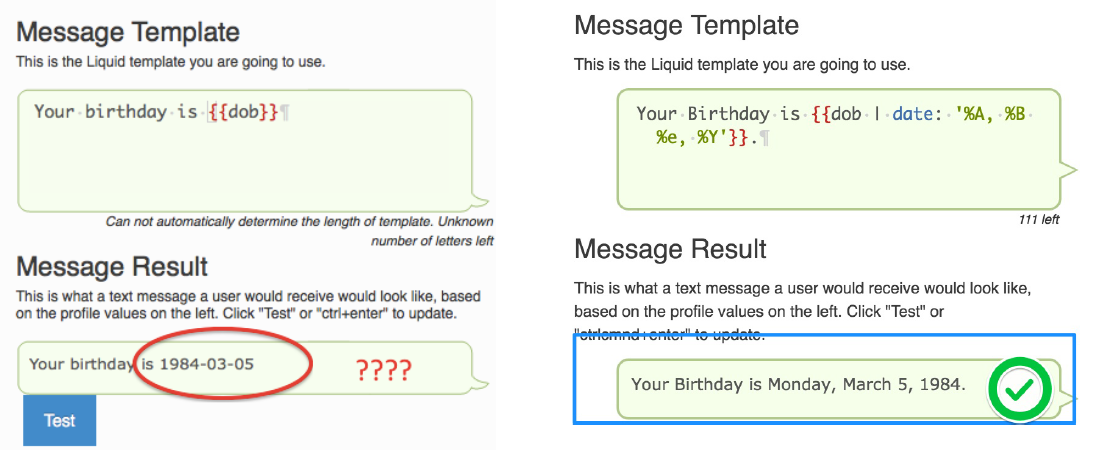
-
Present your data w/o confusion.
-
Your birthday is {{ dob | date: ‘%A, %B %e, %Y’ }}.
-
Change the data.
-
“{{ first_name | capitalize }}” changes “Hey joe” to “Hey Joe” (no matter how the data was saved).
Comparing numbers
{% if week2_weight < week1_weight %} Congrats! You lost weight this week!
{% elsif week2_weight > week1_weight %} Eek, you actually put on some weight this week. Try harder for next week!
{% elsif week2_weight == week1_weight %} No change this week, try harder next week!
{% endif %}
Nesting tags
{% if state == ‘DC' %}
{% if gender == ‘male' %} Males from District 12 report to the training area at noon
{% if gender == ‘female' %} Females from District 12 report to the training area at 12:30
{% endif %}
{% endif %}
Assign
We use ‘assign’ when we need to create a variable in a text, that isn’t saved as a custom field.
{% assign hour = ‘now’ | date: ‘%H’ | plus: 0 %}
{% if hour > 8 and hour < 18 %} We’re in the office!
{% else %} We’re closed
{% endif %}
HOUR is our variable (since it will change depending on when a user texts)
We use “plus 0” here to turn ‘now’ into a number, so we can compare using < and >.
Relative date options
You can use templates with relative dates to send different messages to subscribers based on when a date is. Works in conjunction with date type fields.
{% if custom_date_field is_before '2016-07-04' %} Your date is before!
{% endif %}
{% if custom_date_field is_after '2016-07-04' %} Your date is after!
{% endif %}
{% if custom_date_field is_same_day_as '2016-07-04' %}Your date is the same day!
{% endif %}
Relative date options include:
-
Sunday, Monday, Tuesday, Wednesday, Thursday, Friday
-
January, February, March, April, May, June, July, August, September, October, November, December
-
Winter, Spring, Summer, Fall
-
Yesterday, Today, Tomorrow
-
Last Week, Next Week
-
This Tuesday (or any day of the week)
-
mon 2:35
-
this month, next month
-
last winter
Working with dates
Check if a date is greater than 14 days away.
Days are calculated using seconds: 14 days * 24 hours * 60 minutes * 60 seconds = 1209600
{% assign today = 'now' | date: '%s' %}
{% assign fourteen_days = 1209600 %}
{% assign fourteen_days_from_now = fourteen_days | plus: today | date: "%Y-%m-%d" %}
{% if my_date is_after fourteen_days_from_now %} Your date is after 14 days from now.
{% else %} Your date is before 14 days from now.
{% endif %}